PHP2Shell is the name for two critical PHP vulnerabilities, CVE-2026-109618 and CVE-2026-109619, that can let attackers run code on a server without a login. PHP fixed them on October 21, 2026. Blue Arctic was tracking the issue before the fixes were released, had our servers ready for the update, and deployed the applicable patches promptly once they became available that day. If your site is on our Shared Web Hosting, you don’t need to install those patches yourself.
The PHP security team gave notice on October 20 that a security release would follow the next day at 14:00 UTC, which was 10 a.m. Eastern, and held back the technical details until then. The release arrived on schedule. Below is what the flaws are, why updating WordPress doesn’t touch them, how serious they look in practice, and how we handled them on our side.
October 23 update (CVE-2026-115560): our October 21 PHP hardening matches PHP’s new advisory
Added October 23, 2026.
On October 23, PHP published an informational advisory about another issue, CVE-2026-115560, which has its own CVE number. It is a possible remote code execution path involving PHP’s session upload progress feature, which lets PHP report how far a file upload has gone. It can only happen under an unusual combination of configuration and application code: a site has to set its session serialize handler to php_binary or php_serialize, switch it to php at runtime with ini_set() before starting a session, and still have session upload progress enabled. PHP calls the risk unlikely, is handling it in its regular release cycle rather than with an emergency release, and recommends setting session.upload_progress.enabled=0 until its next regular bugfix release.
That is a setting we had already changed. On October 21, as part of our PHP2Shell response, we disabled session upload progress in the cPanel EA-PHP 8.3, 8.4 and 8.5 php.ini files on Rainier, one of our Shared Web Hosting servers. We backed up the original files first and confirmed the new value for all three versions from PHP’s command line. PHP had listed the same setting on October 21 as a mitigation for CVE-2026-109619, and its October 23 advisory says that anyone who applied it then should keep it in place.
To be clear about what this is and isn’t: we didn’t know about CVE-2026-115560 before PHP disclosed it. We applied a hardening step PHP recommended for CVE-2026-109619, one of the two PHP2Shell flaws, and PHP has since recommended the same step for the new issue. CVE-2026-115560 has its own CVE number, separate from the two PHP2Shell CVEs. The October 21 patches fixed CVE-2026-109618 and CVE-2026-109619; they don’t fix CVE-2026-115560. Until PHP releases a fix, the session upload progress setting is the mitigation PHP recommends. No exploitation of CVE-2026-115560 had been reported when The Hacker News covered PHP’s advisory on October 23.
What PHP2Shell is
PHP is the language WordPress is written in, and it is also the program on the server that runs that code to build the pages visitors see. PHP2Shell is a pair of bugs in that program. Neither one is in WordPress, a theme or a plugin.
| CVE | What goes wrong | Severity |
|---|---|---|
| CVE-2026-109618 | If PHP runs out of memory at the wrong moment while handling a request, it can leave internal data half built, and its cleanup code may then treat that broken data as valid. | Critical, CVSS v4.0 9.2 |
| CVE-2026-109619 | Data that belonged to one request can outlive it. A later request handled by the same PHP worker can use that stale data before it gets reset. | Critical, CVSS v4.0 9.2 |
Either bug can end in remote code execution: an attacker sends crafted web requests and gets the server to run commands with the same permissions as the site’s PHP process. No account or password is needed. PHP’s advisory says every installation that serves web requests is at risk, whether PHP runs through PHP-FPM, Apache’s mod_php, php-cgi, FrankenPHP or LiteSpeed. It considers the risk highest for mod_php, where a demonstrated exploit can trigger the attack before any website code runs.
The fixed releases are 8.5.12, 8.4.27, 8.3.36 and 8.2.35. PHP 8.1 and older get no release from the PHP project, although its security team published source patches for 7.4, 8.0 and 8.1. PHP lists temporary settings that narrow specific attack paths, but it is plain that only the update is a complete fix.
Sansec traces the name to an exploit tool, credited to the research firm Calif, that chains both bugs into one attack. CISA, CloudLinux and Amazon all use it for the pair.
Why updating WordPress doesn’t fix it
Most WordPress security news is about a plugin or theme, and the fix is an update in your dashboard. PHP2Shell sits a layer below that. When a request arrives carrying a form upload, PHP parses it before WordPress loads. The session upload progress feature involved in one attack path is on by default and works even if a site never uses sessions. A site with WordPress, every plugin and every theme fully up to date could still be exposed if the PHP underneath it was unpatched.
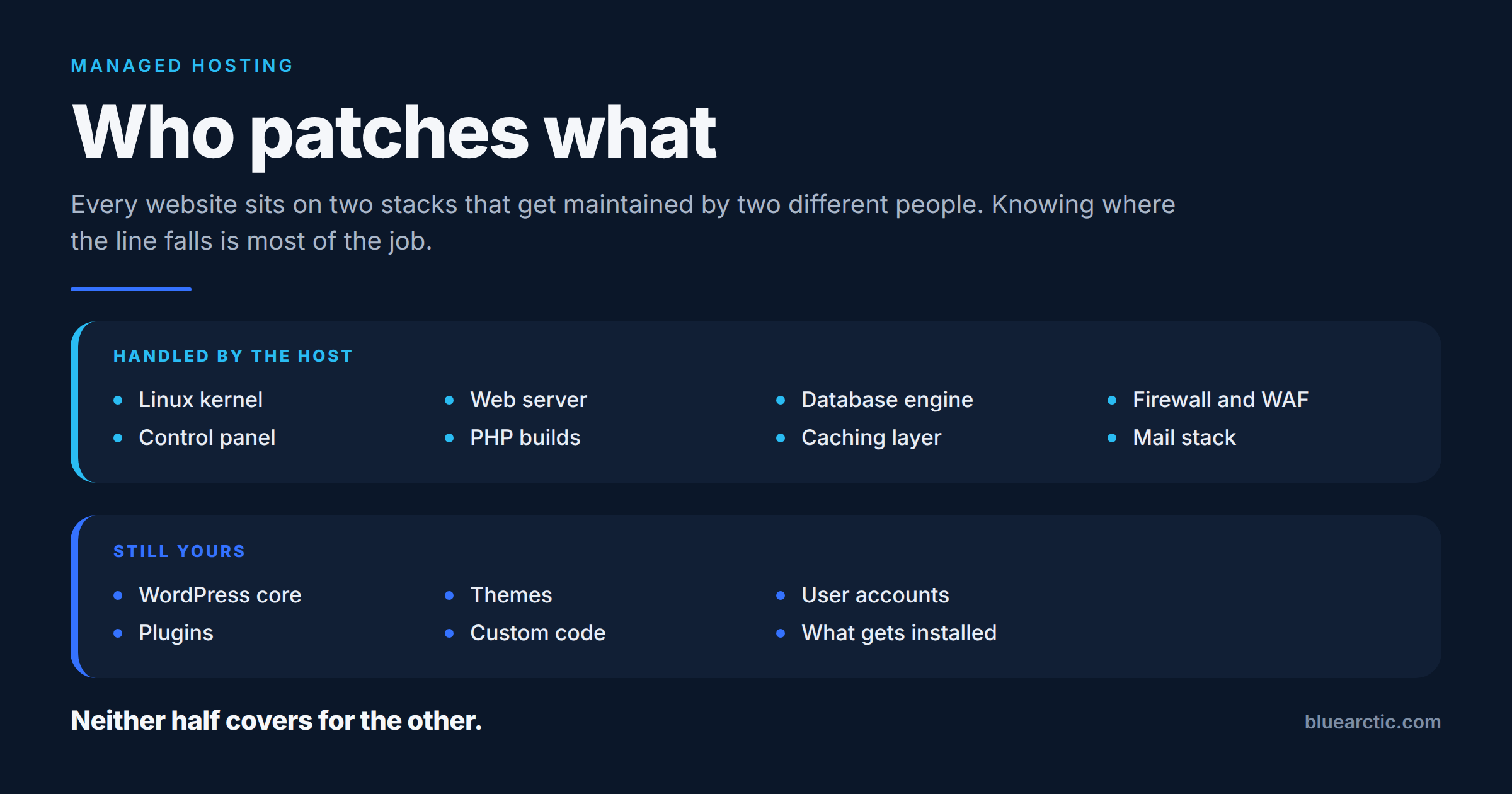
That puts the fix on the server. On managed hosting, that’s the host’s job, and we explain where that line falls in Who Patches What in Managed Hosting.
How exposed any one site was depended on how its PHP runs. PHP demonstrated the most direct attack against Apache with mod_php. On PHP-FPM, the attack PHP validated needs more to line up, such as a suitable operation inside the application. For LiteSpeed, PHP’s advisories call an attack likely but not yet validated, and still list LiteSpeed as at risk. Sansec also reports that Calif confirmed code execution without a login on recent releases of several popular applications, WordPress 7.1.2 among them. WordPress sites were in scope; the server setup decided how easy they were to reach.
How serious is it in practice?
The reporting points two ways.
Attackers moved early. Amazon’s threat intelligence team says its honeypot network recorded an exploitation attempt on October 17, four days before the fixes were released, then broad exploitation attempts from more sources on October 21 as proof of concept code appeared. Amazon also says it is unclear whether the October 21 attempts would have succeeded against real systems.
Turning those attempts into reliable attacks looks harder than the severity score suggests. CISA said on October 21 that it had not observed exploitation at the time it published its alert. On October 22, Sansec reported that the public proof of concept exploits don’t work against a default PHP installation, and that most depend on a separate flaw in the target application.
Our read: this deserved fast, calm action, not panic. That is how we treated it.
From notice to patched servers, and the October 23 advisory
Times are US Eastern; Amazon published a date only for October 17. The Blue Arctic rows are ours; the rest are public.
| When (Eastern) | What happened |
|---|---|
| Oct 17 | Amazon’s honeypots record the earliest known exploitation attempt. |
| Oct 20 | PHP announces a critical security release for the next day. CloudLinux opens a status incident at 5 p.m. |
| Oct 20 to 21 | Blue Arctic monitors PHP and CloudLinux and prepares our servers for the update. |
| Oct 21, 10:00 a.m. | PHP releases 8.5.12, 8.4.27, 8.3.36 and 8.2.35 with its advisory. CISA issues an alert the same day. |
| Oct 21, 4:55 p.m. | CloudLinux’s patched ea-php packages, the PHP builds cPanel uses, reach its stable repositories. |
| Oct 21, evening | CloudLinux reports the release of its patched alt-php packages to its stable repositories complete. |
| Oct 21 | Blue Arctic deploys the applicable patched packages promptly as they become available. |
| Oct 21 | Blue Arctic disables session upload progress in the cPanel EA-PHP 8.3, 8.4 and 8.5 php.ini files on Rainier. |
| Oct 23 | PHP publishes an informational advisory for another issue, CVE-2026-115560, and recommends the same setting. |
How we handled it
We knew before the fix was released
PHP’s notice on October 20 gave a date and a severity, and nothing more. There was no public patch to install and no official technical detail to act on. That stretch is where a host’s habits show. We were already tracking PHP’s announcement and CloudLinux’s status updates, and we prepared our servers so that the work on the 21st would be deployment, not catching up.
We deployed promptly once the right packages were available
For Linux servers, PHP’s release on the 21st was source code, and servers like ours don’t run PHP compiled from php.net. They run packaged builds from the operating system vendor, and for our Shared Web Hosting that’s CloudLinux. So the patch that mattered for our customers was CloudLinux’s, and its packages arrived that afternoon and evening. We deployed the applicable patches promptly once they were available on October 21.
Our Shared Web Hosting customers didn’t have to do anything
Server-level PHP is on our side of the line. Blue Arctic handled the applicable PHP updates for our Shared Web Hosting customers, so nobody had to log in, find a package or wait for a support reply to get the fix.
One thing worth knowing if you check: CloudLinux’s first fixed builds applied PHP’s fix to the versions it already shipped rather than moving to the new version numbers. A patched build can report PHP 8.4.26 or 8.3.35, so a version check alone may make a patched server look unpatched. CloudLinux has since started publishing alt-php builds that carry the php.net numbers and says ea-php will follow, which will clear that up as they roll out. If a public “is my site vulnerable” checker flags your site based on its version number alone, that’s why.
This is how we work, not a one-off
We’ve been running hosting infrastructure since 2002, and staying ahead of security issues is ongoing work for us, not something reserved for vulnerabilities with names. Earlier this year we wrote up our response to the Linux kernel flaws Dirty Frag and Copy Fail, and to Fragnesia and recent cPanel security updates. PHP2Shell got the same treatment: watch closely, prepare early, deploy promptly.
We don’t wait for a security issue to become a customer problem. For PHP2Shell, that meant five layers of ordinary, careful administration:
- Awareness: tracking PHP’s advance notice before the patches were released, then CloudLinux’s package announcements.
- Preparation: getting servers ready so release day was about deployment.
- Prompt deployment: installing the applicable patched packages once they were available.
- Hardening: disabling session upload progress in Rainier’s php.ini files, a mitigation PHP listed for CVE-2026-109619.
- Continued monitoring: reading new advisories as they came, including PHP’s October 23 notice.
Why an experienced hosting provider matters
A lot of hosting maintenance runs on automatic updates, and for routine patches that works. This release showed where it falls short. When CloudLinux’s patched packages first appeared, the security metadata that marks updates as security fixes hadn’t been published yet, and CloudLinux warned that security-only updates such as yum --security would not list them. A server set to install only flagged security updates would have skipped the fix that night.
Other details needed a person reading closely. CloudLinux corrected one of its own earlier updates on the evening of October 21, and the next day it noted that some servers couldn’t see the fixed packages until another package, cloudlinux-release, was updated first. That’s normal in a fast release, and it’s why someone has to read the notices rather than trust a scheduled job.
Mitigations have the same kind of detail. PHP’s October 21 guidance says to set session upload progress in php.ini, an FPM pool or server configuration that applies before request parsing, not to rely on ini_set() or a .user.ini file, and to restart every worker afterward. Getting a recommendation like that right takes administrators who know how PHP, CloudLinux, cPanel and LiteSpeed fit together. Security is not an automatic update once a week.
| Hands-off automatic updates | Experienced, hands-on administration | |
|---|---|---|
| When work starts | When an update appears | When the first notice appears, before a patch is public |
| Knowing which fix applies | Whatever the update job picks up | The vendor build that matches how PHP actually runs on each server |
| Fixes not yet flagged as security updates | Can be missed until the metadata catches up | Picked up from the vendor’s own notices |
| Reading the result | The version number | The package itself, because backported fixes keep the old number |
| Telling customers | Not part of the process | A plain account of what happened and what, if anything, they need to do |
Patching is the fix, and the other layers limit damage when something slips past. On Shared Web Hosting, CloudLinux gives each account its own CPU, memory and process limits, and CageFS keeps each account’s files out of view of the others. Because PHP2Shell runs code with a site’s own permissions, that isolation narrows what one compromised site could reach. Imunify360 scans files as they’re written and quarantines infected ones, we monitor file changes and unusual log activity around the clock, and Shared Web Hosting accounts get daily off-site backups kept for 30 days. No single layer is enough on its own, and none of them replaces the patch.
What a compromised website costs a business
For most businesses, the website is where customers check you out, send an inquiry or place an order. A compromised site can redirect visitors somewhere else, show content you never published, capture what people type into your forms, or end up flagged with a warning in Google’s search results. Cleanup takes time, and trust takes longer to rebuild than the site does. That goes double for WooCommerce stores, sites that take payments, and any site that holds customer information. An important business website needs security-conscious hosting administration, not just a server that keeps running. That’s why server-level fixes like this one shouldn’t wait for someone to get around to them.
If you run a practice, clinic or counseling office
Healthcare websites are often simple, but people rely on them for things that matter: requesting an appointment, sending a message, checking your hours. A compromised site can stop doing all of that at exactly the wrong moment.
The bigger question is what your forms collect and where submissions are kept. Many WordPress form plugins save entries in the site’s own database as well as emailing them. An appointment form that asks about symptoms or insurance can quietly turn a marketing website into a place where patient information builds up, and anyone who can run code on the server can reach that database.
On HIPAA, precision matters. Hosting a website with us doesn’t make it HIPAA compliant, and our standard hosting plans are not HIPAA compliant environments; our security page says so directly. Compliance depends on the whole system: what the site collects, where that data is stored and sent, who can access it, the agreements in place with each vendor that handles it, and your own policies and safeguards. If a breach involves unsecured protected health information, HIPAA’s Breach Notification Rule sets duties and deadlines for notifying affected individuals, HHS and, for larger breaches, the media. Business associates must notify the covered entity. Regulated workloads need an environment scoped for them, and our compliance page is where that conversation starts.
For most practices, the practical step is smaller: avoid collecting health details through a general website form unless the whole path, from the form to wherever the data ends up, was set up for it. Sending patients to a portal built for that purpose, or asking only what you need to call them back, keeps far less sensitive information on the website.
Questions worth asking any host
Whoever hosts your site, these are fair questions, and the answers should be specific:
- Who watches for security advisories in the software under my site, and how would I know you acted on one?
- Once a vendor package exists, how quickly is a critical patch evaluated and installed?
- Which PHP versions do you run, and does each one still receive security fixes?
- How do you confirm a patch actually took effect? As this release showed, a version number isn’t always proof.
- Are malware scanning and backups included, and how far back can you restore?
- If a site is compromised, who cleans it up, and who works out how the attacker got in?
- When something like this happens, can I reach someone technical?
Our answers to most of these are on our security page, and the PHP versions we run are in Who Patches What in Managed Hosting.
What you need to do
If your site is on Blue Arctic Shared Web Hosting, nothing about PHP2Shell itself. Keep WordPress, plugins and themes up to date as usual. That layer stays with you, or with us for the parts your Website Care plan covers.
If you manage PHP yourself, on your own server, update through your vendor’s packages and restart your PHP services. Then confirm the fix from the package changelog, or from a version at or above the fixed release, rather than from php -v alone. On CloudLinux servers, CloudLinux’s knowledge base article has the exact commands. If you’d like a second pair of eyes on a server, get in touch.
Quick answers
What is PHP2Shell?
The common name for two critical PHP vulnerabilities, CVE-2026-109618 and CVE-2026-109619, fixed on October 21, 2026. Both can allow remote code execution without a login on servers that run PHP for websites.
Does updating WordPress fix PHP2Shell?
No. The flaws are in PHP, the server software underneath WordPress, so the fix is a PHP update on the server.
Which PHP versions fix PHP2Shell?
PHP 8.5.12, 8.4.27, 8.3.36 and 8.2.35. Some vendors, CloudLinux among them, released patched builds that keep an older version number, so check the vendor’s package notes rather than the version alone.
Is PHP2Shell being exploited?
Amazon recorded an attempt on October 17 and reports broad exploitation attempts in the wild since October 21, though it is unclear whether any succeeded. Sansec reported on October 22 that the public exploits don’t work against a default PHP installation.
Do Blue Arctic Shared Web Hosting customers need to do anything?
No. We handled the server-level PHP updates for Shared Web Hosting and deployed the applicable patches promptly once they were available on October 21. Keep WordPress, plugins and themes updated as usual.
What is the new PHP vulnerability disclosed October 23?
CVE-2026-115560, a possible remote code execution path involving PHP’s session upload progress feature. It needs an unusual setup: the application has to switch its session serialize handler to php at runtime before starting a session, with session upload progress still enabled. PHP calls it unlikely, is handling it in its regular release cycle, and will publish a full advisory with its next release. It has its own CVE number, separate from the two PHP2Shell CVEs.
Does disabling PHP session upload progress help protect against it?
Yes. PHP recommends session.upload_progress.enabled=0 until its fix ships, and says that fully protects against this vector. PHP’s October 21 guidance for the same setting says to set it in php.ini, an FPM pool or server configuration that applies before request parsing, not with ini_set() or .user.ini, and to restart every worker afterward.
Did Blue Arctic implement the recommended mitigation before the new disclosure?
On Rainier, we made the configuration change. On October 21 we disabled session upload progress in the cPanel EA-PHP 8.3, 8.4 and 8.5 php.ini files there and confirmed the value from PHP’s command line, two days before PHP’s October 23 advisory, because PHP had recommended it for CVE-2026-109619. We didn’t know about CVE-2026-115560 in advance; PHP later recommended the same setting for it.
Do Blue Arctic Shared Web Hosting customers need to change anything for CVE-2026-115560?
No. Server-level PHP settings and updates are ours to handle, and we’ll apply PHP’s fix when it ships like any other PHP update. If you’ve changed PHP settings for your own account, for example in cPanel’s MultiPHP INI Editor, don’t turn session upload progress back on. If you’d like to know how this setting stands on the server your site uses, ask our support team.
Most business owners never hear about releases like this one, and they shouldn’t need to. That’s the job a host takes on: watch for the notice, get ready before the fix lands, and deploy it promptly when it does. If that’s what you want from yours, our Shared Web Hosting includes server-level PHP updates handled by our team, and we’ll plan the move of your site with you.
Sources
- PHP: Security advisory: critical remote code execution vulnerabilities and the advance notice of October 20
- PHP security advisories GHSA-w8hw-w9fx-j79w (CVE-2026-109618) and GHSA-6wmf-4rv5-p3rp (CVE-2026-109619)
- CISA: Critical Vulnerabilities in PHP Require Immediate Patching
- Amazon Threat Intelligence: PHP2Shell exploitation prior to public disclosure
- CloudLinux: package status and Imunify360 protection, status page incident and how to verify fixed packages
- PHP: Informational advisory: Session upload progress (October 23, CVE-2026-115560)
- The Hacker News: PHP Warns of Another Unpatched RCE Two Days After Emergency PHP2Shell Patches
- Sansec: PHP2Shell research and October 22 update
- HHS: HIPAA Breach Notification Rule