“Managed VPS” sounds like a product category, but it isn’t one. Put the plan pages of a few hosts side by side and the word covers everything from a hardware-only server with a chat window to a team that patches the operating system and answers for the control panel. Prices are easy to compare. What you actually get for the price is in the scope document, the terms and the SLA, and those take longer to read.
These are the ten questions we would ask any provider before ordering, ourselves included. Each one ends with our own answer, so you can see what a specific answer looks like and hold us to it.
1. What exactly does “managed” cover?
Ask for the scope in writing. Some hosts publish named tiers, so “managed” on one plan isn’t “managed” on the next. At others the word stretches from basic hardware care all the way to an automated assistant. Look for two lists: what the host maintains, and what it doesn’t. Almost every scope document we read excludes your application code, plugins and content. That’s normal. The useful differences are in the middle layer: the operating system, the web server, PHP, the firewall and the control panel. Watch for patching that applies only to software the host installed, and for phrases like “best effort” or “may become billable” attached to anything you expect to be routine.
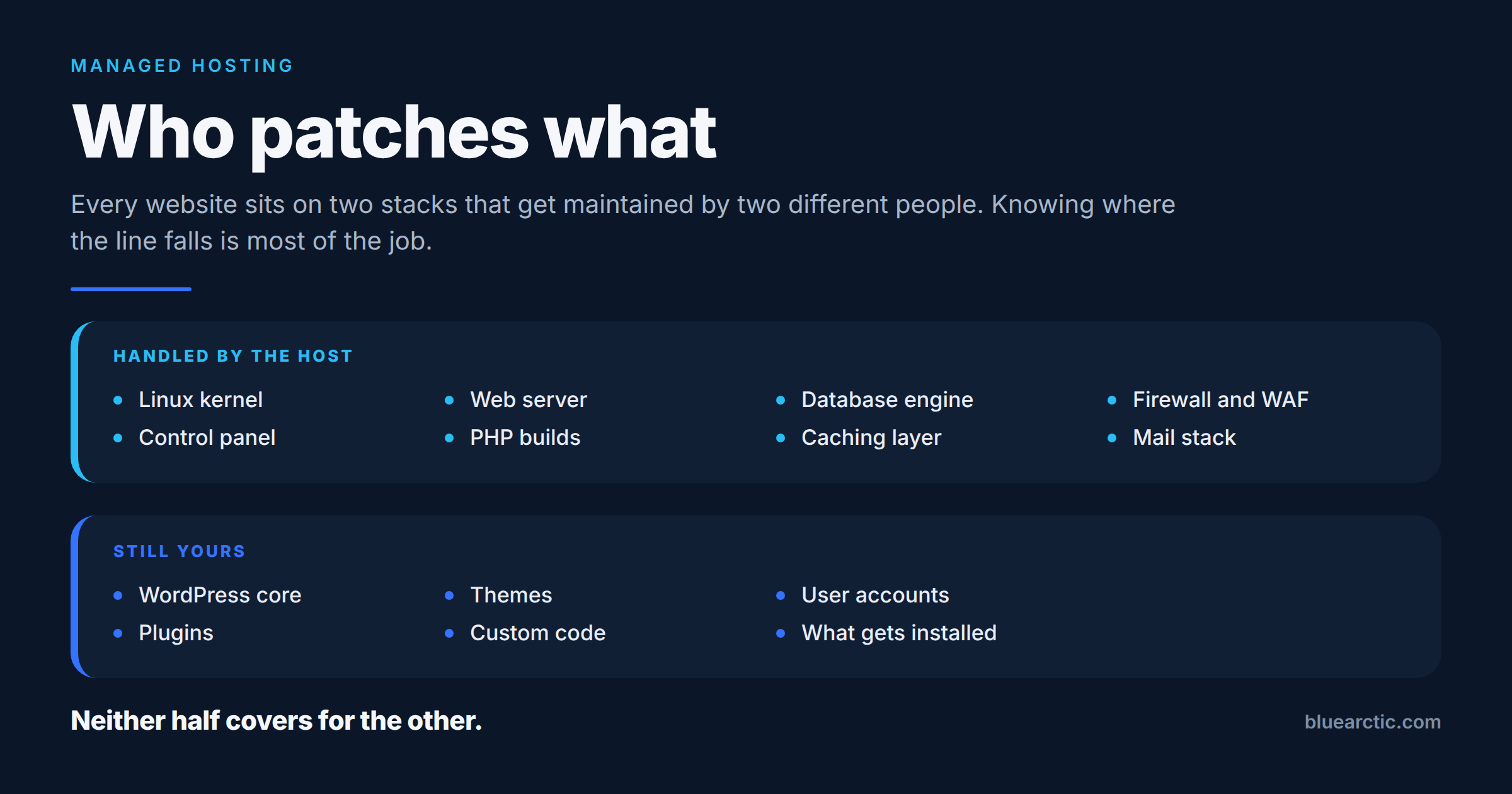
Our answer: Core Managed covers the operating system and the layer around it: OS security patching and kernel updates, hardening, Imunify360, CloudLinux, DDoS filtering, and installing, updating and maintaining cPanel/WHM or Plesk. Your applications stay yours unless you add Server Administration. The full split, layer by layer and product by product, is in who patches what in managed hosting.
2. Do you keep root access?
A managed plan doesn’t always come with root. Some providers withhold it on purpose, so they can be sure nobody changes what they maintain. Others give it on every plan. Both approaches are defensible, but you need to know which one you’re buying, and providers aren’t always consistent: we found plan pages and FAQs on the same site that disagreed. If you install your own software, run cron jobs as root, or need to tune system services, get the answer in writing.
Our answer: full root over SSH from day one. Root also means you can change things we maintain. If a change you make causes a problem, that is outside what we manage, and the SLA excludes downtime caused by software you install (question 6).
3. Which control panel license is included, and how big is it?
“cPanel included” is one of the least specific phrases in hosting. cPanel licenses VPS servers in tiers by number of accounts: Solo (1 account), Admin (up to 5), Pro (up to 30) and Premier (up to 100). Plesk’s entry edition is likewise limited by domain count. A one-account license is fine for a single business site. It isn’t enough for an agency hosting ten clients. Ask which tier is included, what the next tier costs, and whether the license fee is refundable if you cancel. Some providers include a named tier; others bundle “cPanel” with no tier stated, or add it at checkout.
Our answer: a cPanel Solo (1 account) or Plesk Web Admin (up to 10 domains) license is included with every VPS. Higher-capacity licenses are available at additional cost when you order.
4. Which resources are reserved, and which are shared?
On a VPS, “dedicated” and “allocated” are not the same word. Ask which resources are set aside for your server alone and which are shared with other customers on the same host. Read any fair-use clause too: a plan can list four cores and still restrict how long you may use them at full load. Storage speed and network bandwidth are usually shared even when CPU and memory aren’t.
Our answer: our VPS plans run on KVM. The vCPU cores and RAM in your plan are reserved for your server, so another customer on the host can’t borrow them. Storage (SSD RAID-10) and network are shared back-end resources, so we don’t promise reserved disk speed. Bandwidth is metered at 5 TB a month, then $0.50 per GB. If you need the whole machine, that’s a Virtual Dedicated Server.
5. How long are backups kept, and who restores them?
“Daily backups” tells you how often a copy is made. It doesn’t tell you how far back you can go, and that’s the number that matters when a problem is found a week late. Only some providers publish retention at all. Others sell it as an add-on, or keep the default unstated. Ask four things: how many days or recovery points are kept, whether longer retention costs extra, whether you restore it yourself or open a ticket, and whether a restore has a fee. Then read the terms. Every host’s terms we read leave backups as the customer’s responsibility, even where backups are included. Treat the host’s backups as a recovery layer, not your only copy.
Our answer: daily backups with 5 recovery points are included. Longer retention, 15 or 30 days, is a paid option when you order. Restores are by ticket, and we confirm the recovery point with you before anything is overwritten. Our Terms of Service (Section 8) say the same thing other hosts’ terms do: our backups don’t replace your own.
6. What does the uptime guarantee actually cover?
The headline percentage tells you less than three other details: which part of the service it covers, what you get when it’s missed, and how you claim it. On a VPS, most guarantees cover the host’s infrastructure (network, power, the hypervisor), not the operating system or the software running on it. Remedies vary widely: a small credit, a share of the month’s fee, or a credit you can only spend on new purchases. Check the claim window and what evidence is required. Also check that the number on the plan page matches the SLA document. We found several where it didn’t.
Our answer: our Service Level Agreement sets 99.99% Infrastructure Uptime for Managed VPS: network, power, the hypervisor and storage. It doesn’t cover the guest operating system or application problems caused by your own changes. Below 99.99% the credit is 10% of the month’s fee, rising to 25%, 50% and 100% as uptime falls. Claims are made by ticket within 30 days. Scheduled maintenance, announced at least 24 hours ahead and limited to 4 hours a month, doesn’t count as downtime.
7. How quickly does support respond, and is that a promise?
Very few hosts publish a response time. Most say 24/7 without a number. Of the providers we read, one publishes response times (faster on its paid tiers), and another says outright that its targets are not guaranteed. Ask for the target, whether it’s guaranteed or just a goal, and whether a person with server access answers, or a first-line agent who has to escalate.
Our answer: 24/7 support by ticket, with a target first response of under 25 minutes. Our Service Level Agreement calls that a target, not a guaranteed maximum, and response times aren’t covered by SLA credits. We would rather say so plainly than imply a promise.
8. What happens at renewal, and can you leave?
Introductory prices are common, and so are long prepaid terms. The renewal price is the one you’ll pay for years, and not every provider shows it on the plan page. Ask for the renewal rate, the notice period to cancel, and whether the money-back guarantee actually covers a VPS. Many guarantees exclude servers, software licenses or monthly terms, so read the exclusions, not the headline.
Our answer: there’s no setup fee. Services renew automatically at our then-current rate, and the invoice is your renewal notice. To cancel, give us 7 days’ notice before your renewal date in the client portal. Our 30-day money-back guarantee covers Shared Web Hosting and Managed WordPress Hosting, not VPS. The Terms of Service (Sections 13 and 14) set this out in full.
9. Who moves your existing sites, and at what cost?
A migration can be the riskiest day of a new hosting contract. Ask whether it’s included, what counts as a “standard” migration, and who checks that email, DNS and scheduled tasks came across. Paid migration “assist” packages are common. Know which one you’re getting before you sign up.
Our answer: a basic migration from your current host is free for standard cPanel or Plesk setups. We aim to activate a new server within 24 hours of payment and verification, under our Terms of Service.
10. Who is responsible when something breaks in your application?
This is where a “managed” VPS ends at most providers, and where the surprises happen. A slow database query, a plugin that leaks memory, or a site compromised through outdated code are application problems. Usually they’re not covered, or they’re handled at an hourly rate. Ask what it costs to hand that layer over too, and whether that service is covered by the SLA (often it isn’t).
Our answer: applications are yours on Core Managed. Server Administration hands the application layer to our engineers on any host. Like all our Professional Services, it’s outside the hosting SLA. If a site is already compromised, emergency malware removal is a flat-fee cleanup that needs no plan.
The short version
| Question | A specific answer sounds like |
|---|---|
| What does managed cover? | Two written lists: what the host maintains, what stays yours |
| Root access? | Yes or no, in writing, and what changes if you use it |
| Control panel license? | A named tier with an account or domain limit, and the upgrade cost |
| Reserved resources? | Which of CPU, RAM, storage and network are yours alone |
| Backups? | Days or recovery points kept, who restores, any fees |
| Uptime? | What layer is covered, the credit schedule, the claim window |
| Support? | A response target, and whether it’s guaranteed |
| Renewal and exit? | The renewal rate, the notice period, what the refund policy excludes |
| Migration? | What a standard migration includes and what it costs |
| Your application? | Who owns it, and what handing it over costs |
If our answers fit what you need, our managed VPS plans list the specs and prices for each size. If they don’t, these questions will still help you compare the next provider.